Operator Training
7-day money-back guarantee for All Services
Shipping: 2-3 Business Days subject to stock availability
Deployment: Within 24hrs after completing to KYC requirements
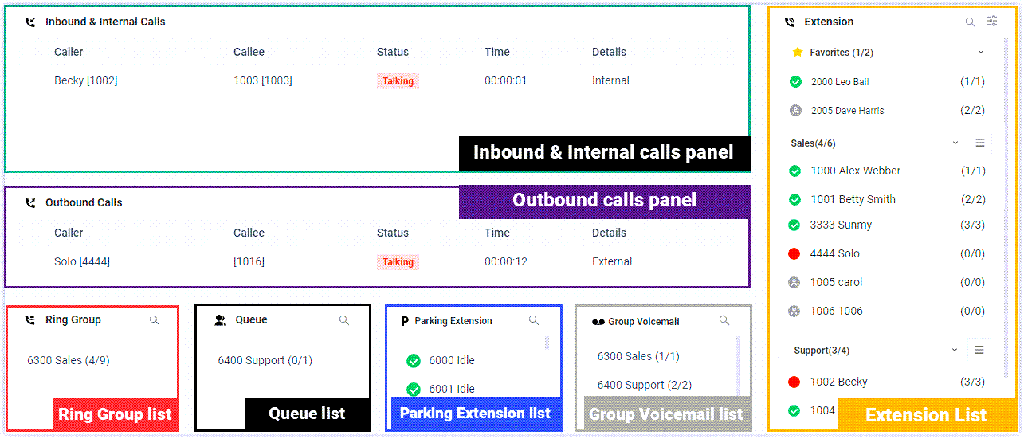
The Cloud One operator training module is designed to equip users with the knowledge and skills needed to effectively operate the Cloud One Operator Panel, a key component of the Cloud One Business Communication Suite. The panel simplifies high-volume call management through a user-friendly, visual interface. During the training, users will learn how to navigate the Operator Panel confidently, monitor and manage real-time call activity, and use click or drag-and-drop actions to handle, transfer, and park calls.
They will also learn to identify the status of extensions, ring groups, and queues, as well as access and manage group voicemails efficiently.
Key topics covered include understanding the interface layout, interpreting status indicators, managing multiple calls simultaneously, and utilizing monitoring tools to view live statuses of ring groups, queues, parked calls, and voicemails. Additionally, the training covers best practices for minimizing response times, ensuring accurate call routing, and managing call loads effectively.
By the end of this training, your operator/ receptionist will be fully prepared to leverage the Cloud One Operator Panel to improve internal communication, reduce delays, and maintain a smooth and professional caller experience.
With an easy-to-use interface on Cloud One Operator Panel, you can manage multiple calls (including your group members' and yours), and direct calls to the appropriate destination quickly and efficiently.
To use the Operator Panel to manage group members' calls and presence, your operator needs to get the corresponding permission from your communication system administrator:
Discover our various training modules:
Check out Cloud One BCS packages to streamline your business communication