
Skip to Content
Cloud One
  • Products

    Business Communication Suite & Phone System


      By Edition

      ​Cloud

      Software

      Appliance

    By Deployment

    ​On-premise

    Hosted by Cloud One

    Self-hosted

    By Management

    ​Managed By Cloud One

    Semi-Managed by Cloud One

    Self-Managed


    Simu Connect UC Clients


    Simu Connect Web Client Simu Connect Mobile Client Simu Connect Desktop ClientSimu Connect Chrome ExtensionSimu Connect TAPI Integration

    SIP Trunks


    Business SIPPay As You Go SIP Country Presence SIPVirtual Phone NumbersGolden Phone NumbersToll Free NumbersBring Your Own Carrier (BYOC)Calling RatesTalktime Top-up

    Get a Proof of Concept Now!


    Simu Connect POC Application Managed Business Communication Suite Self Managed Business Communication SuiteSIP Trunk POCOdoo Phone POC
  • Solutions

    Business Needs


    Work from Anywhere Hosted UCaaS Self hosted UCaaSVideo ConferencingAppliance PBXAI-powered Cloud PBXWhite-label Solution

    Industry


    Call Center Healthcare HospitalityFinanceEducationLogisticsRetail BusinessGovernment Agency

    Ecosystem


    IP Phones SIP Trunks IntegrationHeadsetsVirtual Phone Numbers

    By Integration


    Odoo Phone System Zoho Phone System Salesforce Phone SystemMicrosoft Dynamics Phone SystemZendesk Phone SystemFreshdesk Phone SystemBitrix24 Phone SystemHubSpot Phone System
  • Resources

    Downloads

    Download user guides and more documents

    Book a Meeting

    Schedule a meeting at your convenience

    Developer Guide

    Read API Documentation for Cloud One BCS API

    Business Communication Suite

    Experience our user-friendly business communication suite today. Explore robust telephony features that enhance your client connections efficiently.  

    See More Details
  • Devices

    Yealink IP Phones


    Yealink T3 Series IP Phones Yealink T4 Series IP Phones Yealink T5 Series IP PhonesYealink T7 Series IP PhonesYealink T8 Series IP Phones Yealink DECT IP Phones

    Voice Conferencing Solutions


    VC Room Systems BYOD Solutions Video Phone Video Conferencing Accessories

    Microsoft Solutions


    MS Teams Rooms Systems Microsoft Phones Conference Phones HeadsetsYealink MeetingBoardYealink MeetingBoard Pro

    Zoom Rooms


    Zoom Rooms Systems Zoom Phones Zoom Cameras BYOD Solutions
  • Help

    Ticketing System


    Submit a Helpdesk TicketReport an Issue

    Training


    User TrainingOperator TrainingCall Center Agent TrainingSupervisor Training

    Frequently Asked Questions


    General FAQBCS FAQSIP Trunks FAQLocal Phone Numbers FAQ

    Contact Us


    WhatsApp Icon


  • Support Helpdesk Contact
  • +254 20 790 0100
  • support@cloudone.co

  • Accounts Helpdesk Contact
  • +254 20 790 0000
  • finance@cloudone.co
  • Visit our Office


    Cloud One Ltd

    Saachi Plaza - Unit A3, Argwings Kodhek Road, Nairobi, Kenya
    P.O.Box 76484-00508 Yaya Centre

    +254 20 790 0000

    hello@cloudone.co


    Kindly do not email multiple contacts as it creates multiple tickets on our CRM


  • Contact Us
  • Blog
    ​​
  • Sign in
  • 0
  • 0
  • Deploy in hours Certified Experts Zero Setup / License Fees*
  • Follow us
    Click here to setup your social networks
    Click here to setup your social networks
Cloud One
  • 0
  • 0
    • Products
    • Solutions
    • Resources
    • Devices
    • Help
    • Contact Us
    • Blog
  • Deploy in hours Certified Experts Zero Setup / License Fees*
  • Follow us
    Click here to setup your social networks
    Click here to setup your social networks
  • Sign in
  • ​​
  1. All products
  2. Brands
  3. Yeastar
  4. IP PBX
  5. P-Series Software IP PBX
  6. AI Transcription Subscription
  7. P-Series Software IP PBX
Pricelist: ZERO PRICE Pricelist
ZERO PRICE
Pricelist: ZERO PRICE Pricelist
ZERO PRICE
AI Transcription Subscription

AI Transcription Subscription

Our Cloud and On-premise PBX Solutions support AI transcription for voicemails and calls, which can convert voicemail messages and call audio into readable text using the built-in AI engine or third-party AI services, allowing users to quickly review voicemail messages and call details.
Select Simultaneous Calls Price per Simultaneous Call
0.00 KSh
0.00 KSh
0.00 KSh
0.00 KSh
Tax Excluded
Contact Us
Terms and Conditions 
7-day money-back guarantee for All Services
Shipping: 2-3 Business Days subject to stock availability
Deployment: Within 24hrs after completing to KYC requirements
We accept bank transfers, credit cards, PayPal, and M-Pesa as payment methods.

Share

AI Transcription

Our Cloud and On-premise PBX supports AI transcription for voicemails and calls, which converts voicemail messages and call audio into readable text using the built-in AI engine or third-party AI services, allowing users to quickly review voicemail messages and call details.

Requirements and restriction

Requirements

ItemRequirement
Firmware84.23.0.83 or later.
SubscriptionSubscribe to Enterprise Plan or Ultimate Plan to ensure the AI Transcription feature is available.

Restriction - AI Voicemail Transcription can NOT be used simultaneously with the Legacy Google Cloud Speech-to-Text API integration.

Note: Starting from version 84.23.0.83, the legacy Google Cloud Speech-to-Text API integration will no longer be maintained. For better security, it is recommended to disconnect the existing legacy integration and migrate to AI Voicemail Transcription, which is based on the latest Google Cloud Speech-to-Text API (v2).

Highlights

Instant & accurate transcription - Deliver accurate voicemail-to-text and call-to-text conversion, allowing users to easily review and prioritize important messages.

Effortless transcript review & adjustment - Allow users to easily review, edit, and fine-tune the AI-generated transcripts to clarify information, add personal notes and clear key points.

Flexible transcription modes - Support both automatic and manual transcription modes, allowing users to choose whether to transcribe voicemails and calls automatically or only when needed.

Multi-language support - Provide multiple languages for transcribing of voicemails and calls. Extension users can set their preferred transcription language individually.

Various transcription services - Support AI transcription powered by the built-in AI engine or third-party AI services (provided by Amazon, Elevenlabs, OpenAI, Google). This allows you to select the preferred transcription service provider based on your transcription budget and functional capabilities of different AI services, achieving more cost-effective, more secure and more accurate transcription.

Guidelines

Configure AI transcription feature

  1. Enable and configure AI transcription feature - Enable the AI transcription feature for the system. Choose the desired transcription service (the PBX's built-in AI engine or third-party AI services), set the desired transcription language and specify which extensions are allowed to use the transcription feature.
    FeatureReference
    AI Call Transcription
    • Configure AI Call Transcription with Built-in Service
    • Configure AI Call Transcription with Amazon Service
    • Configure AI Call Transcription with ElevenLabs Service
    • Configure AI Call Transcription with OpenAI Service
    • Configure AI Call Transcription with Google Service
    AI Voicemail Transcription
    • Configure AI Voicemail Transcription with Built-in Service
    • Configure AI Voicemail Transcription with Amazon Service
    • Configure AI Voicemail Transcription with ElevenLabs Service
    • Configure AI Voicemail Transcription with OpenAI Service
    • Configure AI Voicemail Transcription with Google Service
  2. Customize AI transcription for extensions - After transcription enabled, voicemail messages or calls for authorized extensions can be transcribed into readable text. You can configure the transcription mode (either automatic or manual) and preferred transcription language for each extension individually.

  3. Note: Authorized extension users can customize the AI transcription configuration directly from their Business Softphone. These settings will be automatically synchronized between the PBX and the user’s Business Softphone.

Track AI transcription usage - You can track the usage of AI transcription (powered by the PBX's built-in AI engine) using one of the following methods.

  • View used transcription minutes from the Transcription Usage Details report. For more information, see Access Transcription Usage Details Report.
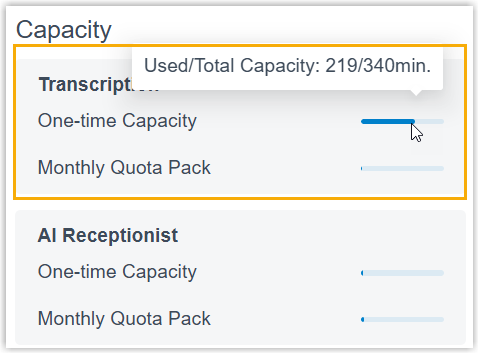
  • View used transcription minutes and total capacity directly from the Dashboard (Only visible to super administrator account).


Discover Cloud One Business Communication Suite

Check out Cloud One BCS packages to streamline your business communication

See all
Your Dynamic Snippet will be displayed here... This message is displayed because you did not provide both a filter and a template to use.
Useful Links
  • Home
  • About us
  • Products
  • Services
  • Shipping
  • Return Policy
  • Warranty
  • Contact us
Legal
  • Terms
  • Privacy
  • Shared Responsibility
    Service Level Agreement
  • Certifications
About us

Cloud One Limited is a leading Kenyan local telephony service provider. Established in 2017, we offer reliable and secure cloud and on premise business communication solutions, including SIP trunks, Yealink IP phones, and VPS hosting in our Tier 3 data center.


Our mission is to revolutionize cloud communications by providing unparalleled reliability, cutting-edge innovation, and substantial cost savings. We deliver a stress-free, always-available service experience that empowers businesses to thrive in the digital age.

DUNS Registration Number: 561230946
Company Registration Number: PVT-5JUEYMA
Licensed & Regulated by the Communications Authority of Kenya


Follow us
Connect with us
  • Contact us
  • hello@cloudone.co
  • +254 20 7900000
  • Saachi Plaza, UNIT A3 - Argwings Kodhek Rd
Download Simu Connect

    Get the app on the playstore

    Download desktop app for Windows​

    Download app from the appstore

    Download MacOS app